Planet Minecraft: Complete Guide to Skins, Maps & Safe Downloads
Explore Planet Minecraft in 2026. Create skins, download maps and texture packs, use PMC on mobile, and learn safer ways to install community content.
If you have ever searched for custom Minecraft skins, adventure maps, texture packs, mods, banners, or impressive building ideas, there is a good chance you have come across Planet Minecraft.
For more than a decade, this community-driven platform has helped Minecraft players discover and share creative content beyond the standard game experience. Whether you want to redesign your character, explore a custom survival world, import a massive castle, or simply get inspiration for your next build, the site offers an enormous library of user-created resources.
But what exactly is Planet Minecraft? Is it safe to download files from the platform? Can Bedrock and MCPE players use its content? And what is the difference between PMC and the official Minecraft Marketplace?
This complete 2026 guide explains everything you need to know.
What Is Planet Minecraft?
Planet Minecraft (PMC) is an independent, fan-operated Minecraft community where players and creators share skins, maps, texture packs, data packs, mods, servers, blogs, banners, and other Minecraft-related content.
The website officially launched on November 8, 2010. Its creator, Cyprezz, explains that he started the platform after becoming interested in Minecraft and seeing an opportunity to give the community a place to share custom creations.
That makes PMC considerably older than the official Minecraft Marketplace, which arrived in 2017.
Today, Planet Minecraft remains one of the best-known independent Minecraft communities. According to the platform, more than 5.8 million Minecraft fans have joined the community since 2010.
Some players also search for terms such as mc planet minecraft, but these searches generally refer to the same PMC ecosystem.
Unlike a traditional digital store, PMC focuses heavily on community participation. Players can publish their creations, follow other creators, comment on projects, participate in events, join groups, and earn profile experience.
What Can You Find on Planet Minecraft?
The biggest strength of Planet Minecraft is the variety of community content available in one place.
Its resource directory currently includes maps, skins, mob skins, texture packs, servers, mods, data packs, blogs, collections, banners, and additional community content.
Here are the most important categories.
Planet Minecraft Skins & Skin Editor
Planet Minecraft skins are among the site's most popular resources.
Instead of using Minecraft's default Steve or Alex appearance, you can browse thousands of community-created character designs ranging from medieval warriors and anime-inspired characters to fantasy creatures, futuristic soldiers, and original designs.
Creators can also build their own skins with the Planet Minecraft skin editor, known as PMCSkin3D.
The editor offers both Basic and Advanced modes. Users can paint pixels directly onto 2D or 3D character models, import existing skins, work with palettes, preview designs, download finished files, or publish them directly to PMC.
If you search for a Planet Minecraft advanced skin editor or Planet Minecraft skin maker, PMCSkin3D is the official tool you are generally looking for.
It is particularly useful for beginners because you can visually rotate the character rather than trying to understand how every part of a flattened PNG template connects.
Planet Minecraft Adventure Maps & Schematics
Maps are another major part of the community.
Planet Minecraft adventure maps can transform Minecraft into something completely different from ordinary survival gameplay.
Depending on the creator, you may find:
- Survival challenges
- Puzzle maps
- Parkour courses
- RPG-style adventures
- Horror maps
- Massive cities
- Fantasy kingdoms
- PvP arenas
- Custom survival worlds
Builders can also share Planet Minecraft schematics.
A schematic stores the structure of a Minecraft build so that compatible tools can reproduce it elsewhere. This can be useful when you want to import a house, castle, statue, farm, or other structure without rebuilding every block manually.
Java players commonly use schematic-compatible building tools or editors such as WorldEdit-related workflows. Always check the creator's installation instructions because file formats and Minecraft version compatibility can vary.
Planet Minecraft Texture Packs, Data Packs & Mods
If you want Minecraft to look different, explore Planet Minecraft texture packs.
Texture and resource packs can alter blocks, items, interfaces, mobs, skies, particles, and other visual elements. Some creators aim for realistic graphics, while others create medieval, cartoon, PvP, minimalist, or fantasy styles.
PMC also includes data packs and mods.
Data packs can modify parts of Java Edition gameplay without requiring the same type of installation as traditional mods. Depending on the pack, they may introduce recipes, structures, loot changes, mechanics, functions, or challenges.
Mods can make considerably deeper changes but may require specific loaders and Minecraft versions.
One keyword players increasingly search is planet minecraft actions and stuff. However, this deserves clarification: Actions & Stuff is an Oreville Studios product distributed through the official Minecraft Marketplace rather than an official Planet Minecraft resource. The current Marketplace listing describes it as a Bedrock texture/animation pack with improved player animations, mob animations, 3D items, particles, and other graphical changes.
Always verify the original creator and legitimate distribution source before downloading similarly named files elsewhere.
Planet Minecraft Banners
Minecraft banners are an easy way to personalize castles, villages, bases, shields, and multiplayer environments.
PMC includes dedicated tools and community designs for Planet Minecraft banners, letting users discover combinations they may not have thought of themselves.
You can experiment with patterns, shapes, colors, symbols, and layered designs before reproducing them inside Minecraft.
For builders who care about visual identity, banners are a surprisingly powerful decorative tool.
How to Use Planet Minecraft on Mobile and MCPE
Mobile players frequently search for mcpe Planet Minecraft because many resources are created primarily with desktop Minecraft players in mind.
The important distinction is between Java Edition and Bedrock Edition.
Minecraft on Android and iOS belongs to the Bedrock family, historically referred to as Minecraft Pocket Edition or MCPE. Therefore, you should always confirm that a resource supports Bedrock before downloading it.
Bedrock-compatible downloads may include formats such as .mcpack or .mcworld. Depending on the device and Minecraft version, opening a supported package can trigger Minecraft and begin the import process.
For Planet Minecraft addons, read the creator's installation instructions carefully because not every Java mod can work on Bedrock.
Is There a Planet Minecraft App?
Searching for a Planet Minecraft app can be confusing.
PMC currently provides an official Progressive Web App, or PWA, which can be installed from the website on supported desktop and mobile devices. The platform announced this functionality in 2024 and continues to provide PWA installation information in its FAQ.
This means you do not need to download a random Planet Minecraft APK from an unfamiliar third-party website to get an app-like PMC experience.
Using the official website or its PWA is the safer approach.
If a third-party site offers an APK while claiming to be the official PMC application, verify the source carefully before installing anything.
Is Planet Minecraft Safe?
One of the most common questions is: is Planet Minecraft safe?
The website itself is an established Minecraft community with an active moderation system. PMC states that moderators help enforce community guidelines, and users can report content or members that violate its rules.
However, it would be misleading to claim that every community download is “99% safe” or completely risk-free.
Planet Minecraft contains user-generated content, and some creators may direct users to external websites for downloads. The security of those external sites is not necessarily controlled by PMC.
Follow these basic precautions:
- Prefer direct downloads and well-established creators.
- Check comments and community feedback before downloading unfamiliar projects.
- Confirm that the file type makes sense for the content.
- Scan downloaded files with reputable security software.
- Be careful with advertising redirects and shortened download links.
- Avoid unexpected executable files such as .exe installers when you are expecting a map, skin, resource pack, or Minecraft package.
Remember that .zip, .rar, and .mcpack extensions are not automatic guarantees of safety. Archives can still contain harmful files, so inspect what you download before opening anything suspicious.
Planet Minecraft Community, Jams and Creative Events
PMC is more than a file-download website.
Creators can maintain profiles, publish blogs, participate in discussions, join groups, showcase portfolios, and interact with other Minecraft fans.
One particularly interesting feature is Minecraft Jams.
PMC describes Jams as community events in which players create and share content around a particular theme. Events can focus on maps, skins, texture packs, data packs, mods, blogs, and other creative categories. Some Jams are ranked while others are informal community challenges.
This social layer is one reason the platform has remained relevant even as newer Minecraft content platforms have appeared.
Players may also encounter searches such as desolate planet minecraft when looking for post-apocalyptic, abandoned-world, alien-planet, or survival-themed community projects. PMC's enormous archive includes many science-fiction and desolate-world concepts created by independent builders over the years.
Planet Minecraft vs. Minecraft Marketplace
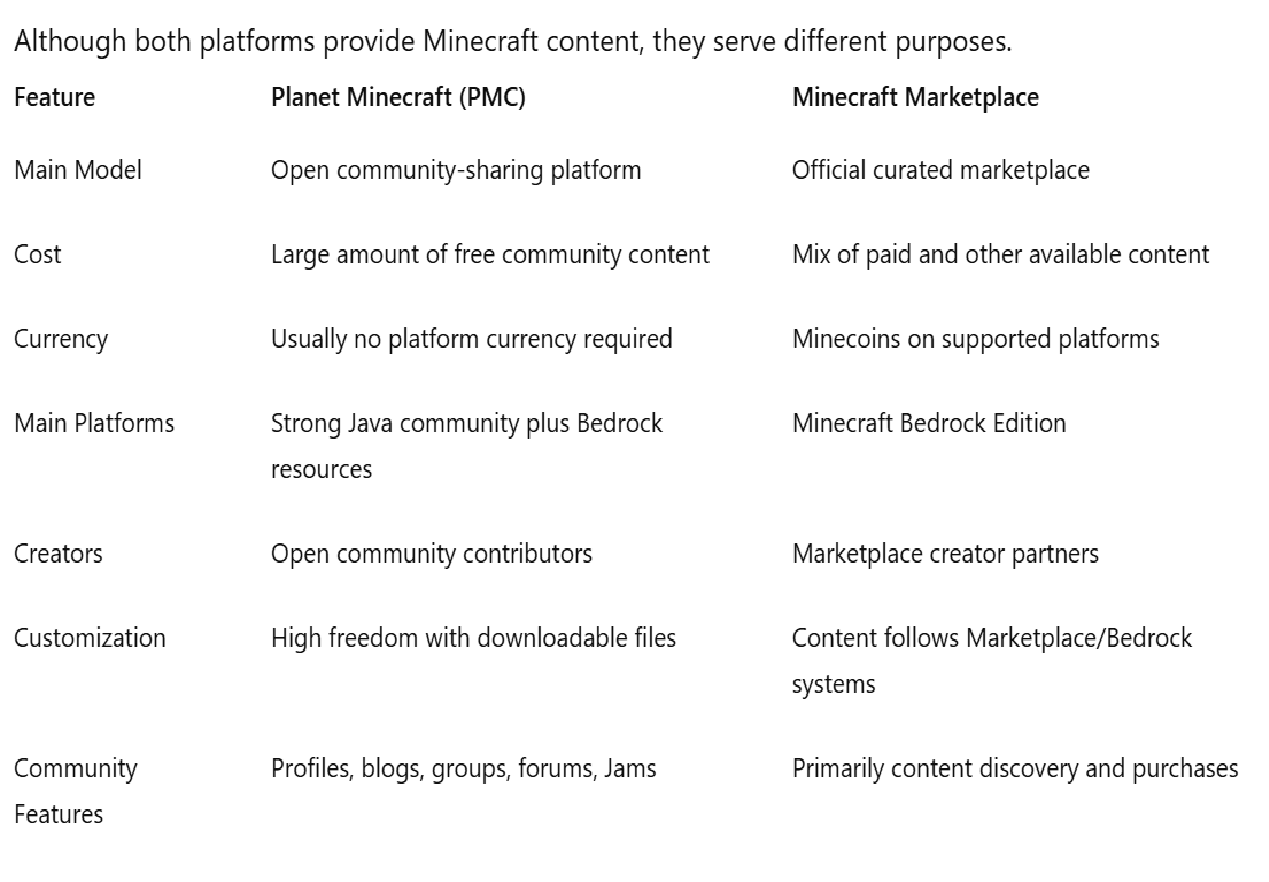
The official Minecraft Marketplace is designed for Bedrock Edition and distributes content from approved creator partners. Minecoins can be used for Marketplace purchases across supported platforms.
Planet Minecraft is more open and community-driven.
That openness can provide far more experimentation, especially for Java players, but it also means users should pay greater attention to compatibility and download safety.
Frequently Asked Questions About Planet Minecraft
How do I upload a skin to Planet Minecraft?
Create or sign into your free PMC account, choose the option to publish content, select the skin category, upload your Minecraft skin file, add the required information, and publish it according to the site's content rules.
You can also create a design directly through PMCSkin3D and use its publishing feature to send your completed skin to your PMC account.
Do I have to pay to download content?
A large amount of content on Planet Minecraft can be browsed and downloaded for free because it is shared by community creators.
However, individual creators may use external download pages, provide optional paid versions, or link to content distributed through another platform. Always check the specific project page before assuming that every external resource is free.
Can I use Planet Minecraft on Android or iPhone?
Yes. The website works on mobile, and PMC's skin editor also supports mobile use. PMC additionally offers an official Progressive Web App that can provide a more app-like experience.
For Minecraft downloads, make sure the resource specifically supports Bedrock or MCPE.
Are Planet Minecraft mods compatible with every Minecraft version?
No. Compatibility depends on the mod, game version, mod loader, and edition of Minecraft.
Always read the creator's requirements before installing a mod.
Is Planet Minecraft officially owned by Mojang?
No. PMC clearly identifies itself as an independent community and states that it is not an official Minecraft product or associated with Mojang.